
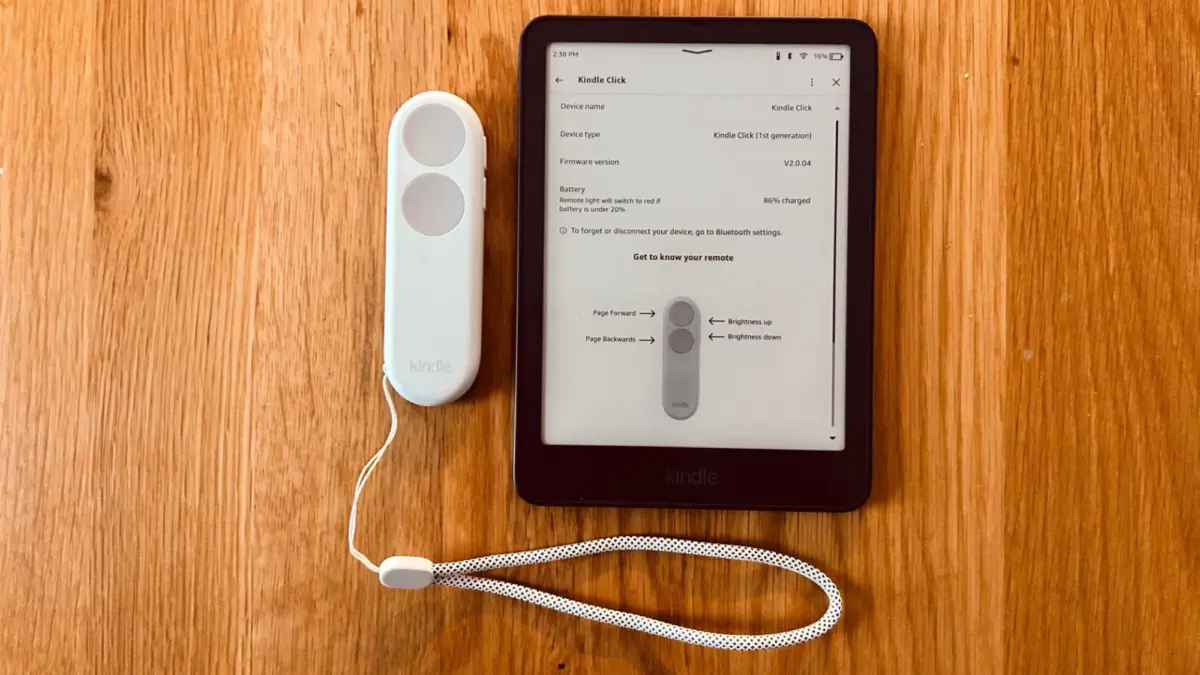
One notable hardware omission has puzzled e-reader enthusiasts for years. Despite the fact that virtually every Kindle released since 2018 has included internal Bluetooth architecture designed to connect wireless headphones, Amazon kept this protocol tightly locked down. Users were barred from pairing anything other than audio gear to their e-readers. This restriction became particularly glaring as wireless page-turn remotes surged in popularity across social media platforms like BookTok, leading rival brands like Kobo and Boox to release official, proprietary peripherals that allowed readers to flip pages from a distance.
Kindle owners were largely left out of the trend, restricted to awkward, mechanical clip-on remotes that physically attached to the bezel of the device and mechanically tapped the screen when a remote button was pressed. These bulky third-party clip-ons presented significant drawbacks, as they could only turn pages in a single forward direction and persistently blocked a portion of the digital text.
That era of restriction has finally come to an end. Amazon has officially relented, launching its own branded Bluetooth remote control known as the Kindle Click. Crucially, the company has updated its internal firmware to unlock the Bluetooth protocol on eligible hardware, permitting direct wireless connectivity with the new accessory. There is, however, a significant hardware caveat: the Kindle Click and the updated Bluetooth firmware are officially restricted to Kindle devices manufactured in 2024 or later. For owners of the newly refreshed Kindle Paperwhite Signature Edition and other recent models, the accessory offers a long-awaited native solution.
What is the point of a page-turn remote for an e-reader?

For readers who have never incorporated a remote control into their reading habits, the concept can initially seem superfluous. Skeptics often question the utility of introducing an auxiliary battery-powered device when a simple tap on a touchscreen or a press of a physical page-turn button requires so little effort. Yet, for specific use cases and reading environments, a remote control solves ergonomic challenges that traditional e-reader handling cannot address.
The most practical application for a remote control arises during physical exercise, particularly when holding an e-reader steady becomes difficult or impossible. Maintaining a stable grip on a Kindle while navigating an elliptical trainer presents a notable challenge, and attempting to read while exercising on a stationary bike often causes the text to bounce aggressively within the reader’s field of vision. By propping the e-reader securely onto the exercise equipment’s console or a nearby shelf, a user can effortlessly advance through chapters using a small handheld clicker without breaking their workout stride or adjusting their posture.
Beyond physical fitness routines, comfort plays a major role in the growing demand for remote accessories. Reading beneath a heavy, insulating blanket during cold weather ranks among the most popular leisure activities for avid book lovers, but keeping hands exposed to the chilly ambient air just to turn the page undercuts the overall comfort of the experience. By positioning the e-reader at a comfortable distance within the field of view, readers can keep their hands warm and tucked beneath a weighted throw while advancing the narrative with a subtle press of a button. For dedicated readers who prioritize absolute physical comfort, the ability to control their library remotely justifies the investment in specialized accessories.
The Kindle Click delivers on its basic promises
The Kindle Click retails for approximately thirty-five dollars before taxes. While that price point might seem steep for a compact peripheral with limited functions and a sparse layout of four physical buttons, it represents only a modest markup over competing products like the popular Boox Tappy. Alongside the release of the Kindle Click, Amazon’s latest firmware updates reportedly open the door for certain cheaper third-party Bluetooth alternatives to function with recent Kindle models, though compatibility and performance consistency remain unverified compared to the official hardware.
Operating the Kindle Click is a straightforward process. Users initiate pairing mode by pressing and holding a designated button on the remote, then navigate to the settings menu on any compatible 2024 or later Kindle model to locate an accessories menu. Selecting the Kindle Click from the available device list establishes the initial connection, provided the e-reader’s software is fully updated. Once paired, the remote maintains a persistent connection, automatically linking to the e-reader whenever both devices are powered on, nearby, and operating with Bluetooth enabled, eliminating the need for repetitive manual pairing sessions.

Once a digital book is open, the remote allows users to advance or reverse pages using the primary buttons, which can be custom-mapped to match individual directional preferences. Additionally, the smaller side buttons, which resemble standard volume controls, are dedicated to adjusting the brightness level of the device’s built-in front light. The remote functions strictly as a reading aid within an active book, meaning it cannot be used to navigate the device’s home screen, access menus, or launch a different title. Readers must make their literary selections before settling in for a remote-controlled reading session.
Room for expanded functionality and versatility
While the Kindle Click performs its core functions reliably, industry observers and users note that Amazon missed an opportunity to expand the device’s utility through more creative engineering. Competing peripherals like the Boox Tappy feature multiple operating modes that allow users to repurpose the remote for entirely different tasks, such as skipping audio tracks in an audiobook or scrolling vertically through web pages.
Given that modern Kindle devices fully support Audible audiobooks, the omission of basic audio controls on the Kindle Click is particularly noticeable. Users cannot utilize the remote to pause playback, jump between chapters, or adjust listening volume—features that would make the accessory significantly more attractive to mixed-media consumers who alternate between reading text and listening to narration.
Similarly, while the inclusion of front-light brightness adjustments is a welcome addition, the remote lacks any method for controlling screen warmth. Color temperature adjustments have become a standard expectation for modern premium e-readers, and allowing users to toggle warmth settings directly through button combinations or secondary modes would have elevated the product’s value proposition. Although integrating such advanced versatility might require additional engineering complexity, the vast resources at Amazon’s disposal suggest that broader functionality could have been achieved. As it stands, the Kindle Click solves a specific, long-standing demand for wireless page-turning, even if its capabilities remain somewhat restricted compared to the wider market of third-party alternatives.