Currently available to developers and public beta testers, iOS 27.2 offers an early look at what Apple has planned for the final months of the year. As with any pre-release operating system software, technology analysts and Apple representatives advise users to proceed with caution if they intend to install the beta on their primary daily devices. Enrolling an iPhone in Apple’s beta software program is a straightforward process via the official Apple Beta Software Program portal, but it inherently carries the risk of software bugs, unexpected battery drain, or application incompatibilities. Consequently, standard industry best practices dictate that anyone exploring these early builds should first create a comprehensive and secure backup of their device data using iCloud or a local computer to prevent any potential data loss.
iOS 27.2’s New Health App
Without question, the headline feature of the iOS 27.2 update is a comprehensive overhaul of Apple’s native Health application. For years, the Health app has served as a centralized dashboard for vital statistics, medical records, and third-party app data, but the forthcoming update reimagines the user experience entirely. Fitness users and long-term health tracking advocates will find a wealth of newly integrated tools designed to streamline daily wellness monitoring.
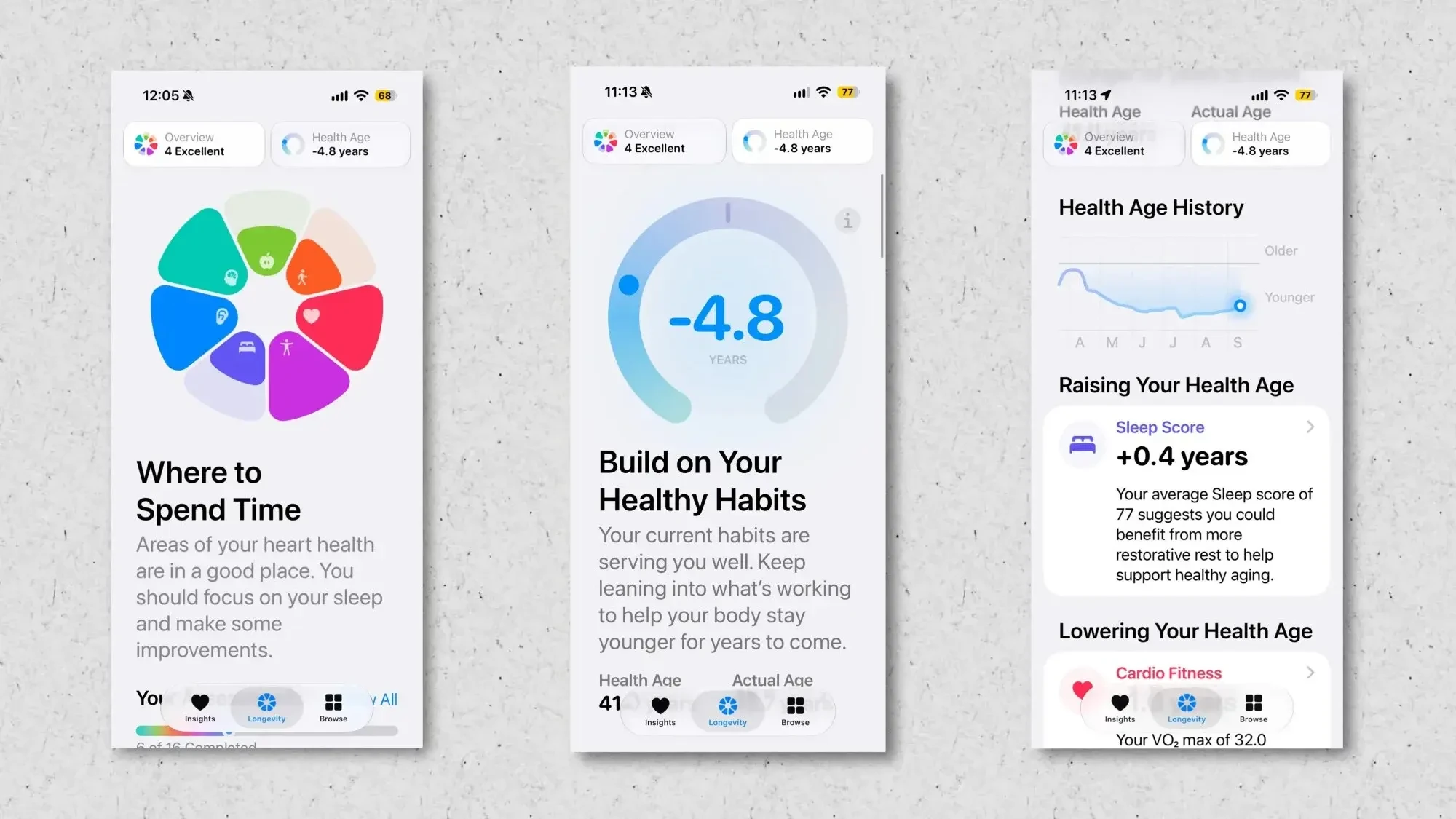
Among the most notable changes is the direct integration of Fitness rings into the Health application, allowing users to view their daily movement metrics directly alongside deeper health data rather than strictly relying on the standalone Fitness app. Furthermore, Apple has introduced a dedicated "Longevity" tab. This new section provides users with a macro-level overview of key indicators influencing their long-term health trajectory, encompassing mental wellbeing, nutritional habits, daily physical activity, cardiovascular health, metabolic markers, sleep hygiene, and hearing conservation.
To help users interpret these vast streams of data, iOS 27.2 introduces structured health assessments. These interactive tools analyze a user’s current baseline and highlight actionable areas for improvement. This includes a novel "Health Age" metric designed to estimate physiological age based on lifestyle and biometric inputs. Perhaps most futuristic is an optional feature that utilizes the iPhone’s front-facing camera to observe users as they perform physical exercises, subsequently rating performance and form across critical pillars of physical fitness such as flexibility, balance, estimated VO2 max, and muscular strength.
This sweeping redesign represents the most ambitious evolution of the Apple Health ecosystem in years, promising a much more cohesive and proactive approach to personal wellness. Industry observers note that the update successfully bridges the gap between active daily workouts and long-term preventative health management, giving users a holistic lens through which to view their daily routines.

iOS 27.2 Expands "Call Context"
Beyond fitness and health, Apple is continuing to refine its proprietary artificial intelligence framework, Apple Intelligence, with targeted utility enhancements. One of the standout AI-driven features introduced in recent software cycles is Call Context. Designed to leverage on-device intelligence safely and privately, Call Context operates dynamically during active telephone conversations. When a user is on a call, the system checks whether the incoming or outgoing number corresponds to a business with relevant data already stored elsewhere on the device—such as an email receipt, calendar invitation, or confirmation message.
When a match is found, Call Context intelligently fetches that relevant information and surfaces it directly on the active call screen. For instance, if a user places a call to an airline customer service line, the feature can automatically display the correct flight number and reservation details by scanning recent itinerary confirmations in the user’s email inbox.
With iOS 27.2, Apple is expanding the scope of Call Context to incorporate personal relationship reminders, specifically focusing on anniversary alerts. When speaking on the phone with a contact for whom a saved anniversary date exists in the system, a subtle, contextual alert will appear on the screen. This addition acts as a convenient digital safety net, ensuring that users receive a timely reminder if they happen to place a routine call on a significant personal milestone without memorizing the exact date. While lighthearted observers note that technology is increasingly stepping in to compensate for human forgetfulness, the practical utility of avoiding awkward social oversights is undeniable.
FaceTime is Getting ASL Support
Accessibility has long been a core pillar of Apple’s software development philosophy, and iOS 27.2 delivers on a commitment made earlier in the year regarding communication inclusivity. During a previous preview of upcoming accessibility tools designed to run alongside Apple Intelligence frameworks, Apple announced plans to introduce a specialized application programming interface (API) for FaceTime. This API is engineered to support the seamless integration of human sign language interpreters directly into active video calls.
Although this specific functionality did not make the initial public release window for iOS 27, it is actively rolling out within the iOS 27.2 development cycle. By enabling human interpreters to join FaceTime calls natively, Apple is bridging communication divides for deaf and hard-of-hearing users, rendering virtual face-to-face interactions significantly more accessible and practical across personal and professional spheres.
Apple TV Profiles Are Coming to iPhone and iPad
Multi-user support has long been a staple of the living room entertainment experience on dedicated hardware like the Apple TV, where individual household members can maintain separate viewing histories, personalized recommendation queues, and tailored watchlist preferences. However, mobile devices such as iPhones and iPads have traditionally been treated as strictly single-user environments at the system and app level, creating friction in households that share a single iPad or pass devices around.
As highlighted by ongoing beta observations, Apple is finally addressing this limitation within its entertainment ecosystem. iOS and iPadOS 27.2 introduce native Apple TV profiles directly to the mobile Apple TV application. This means that if a family shares an iPad or if multiple individuals utilize a secondary device for media consumption, each user can easily switch to their own individual Apple TV profile when it is their turn to watch. While system-level multi-user profiles for the entire iOS operating system remain absent, bringing profile switching directly to the media app represents a welcome step toward accommodating shared household hardware.

Siri AI is Coming in More Languages
When Apple initially launched its advanced Siri AI capabilities, availability was strictly limited to English-language users, leaving international markets waiting for localized model training and regional rollouts. That restriction is beginning to lift with the arrival of iOS 27.2.
According to release notes and beta tracking, Apple is expanding the language support footprint for Siri AI significantly. Once users update their devices to the finalized public release of iOS 27.2, the advanced artificial intelligence assistant will support French, Japanese, Korean, Portuguese, and Spanish. This regional expansion represents a crucial milestone in making Apple’s next-generation assistant technology viable for a truly global audience, bringing sophisticated contextual awareness and advanced semantic processing to millions of non-English speakers.
iOS 27.2 Introduces Small UI Changes
Beyond major feature additions, Apple’s software engineering teams are utilizing the 27.2 development cycle to fine-tune various aesthetic and functional aspects of the user interface. Feedback surrounding certain design choices in iOS 27 has prompted targeted adjustments across several native applications.
In the Apple Music app, for example, designers have dialed back the prominent use of red accents, transitioning several key interactive elements from red to black. This includes the primary Play and Shuffle buttons, as well as various navigational icons embedded within the Library sections, creating a more subdued and content-forward visual presentation.
Elsewhere in the operating system, the Clock app has received a minor typographical adjustment when setting alarms, rendering the "AM" and "PM" indicators noticeably smaller than the primary time numerals for improved visual hierarchy. Within the Podcasts app, the familiar "Up Next" queue label has been officially updated to "New Episodes," a nomenclature shift aimed at improving clarity regarding the nature of downloaded and queued audio content. Finally, inside Siri’s settings menu, the former "App Access" toggle has been renamed to "Excluded Apps," accompanied by an expanded capability that now allows users to designate multiple applications for exclusion from Siri’s data scope simultaneously.