For users eager to experience these developments ahead of the public rollout, the update is currently available through Apple’s developer and public beta testing programs. Enrolling an iPhone in the beta channel allows early adopters to explore the new tools, though standard precautions apply. Because pre-release software inherently carries a degree of instability and potential bugs, tech experts consistently advise users to back up all crucial data to iCloud or a local computer before initiating the installation process.
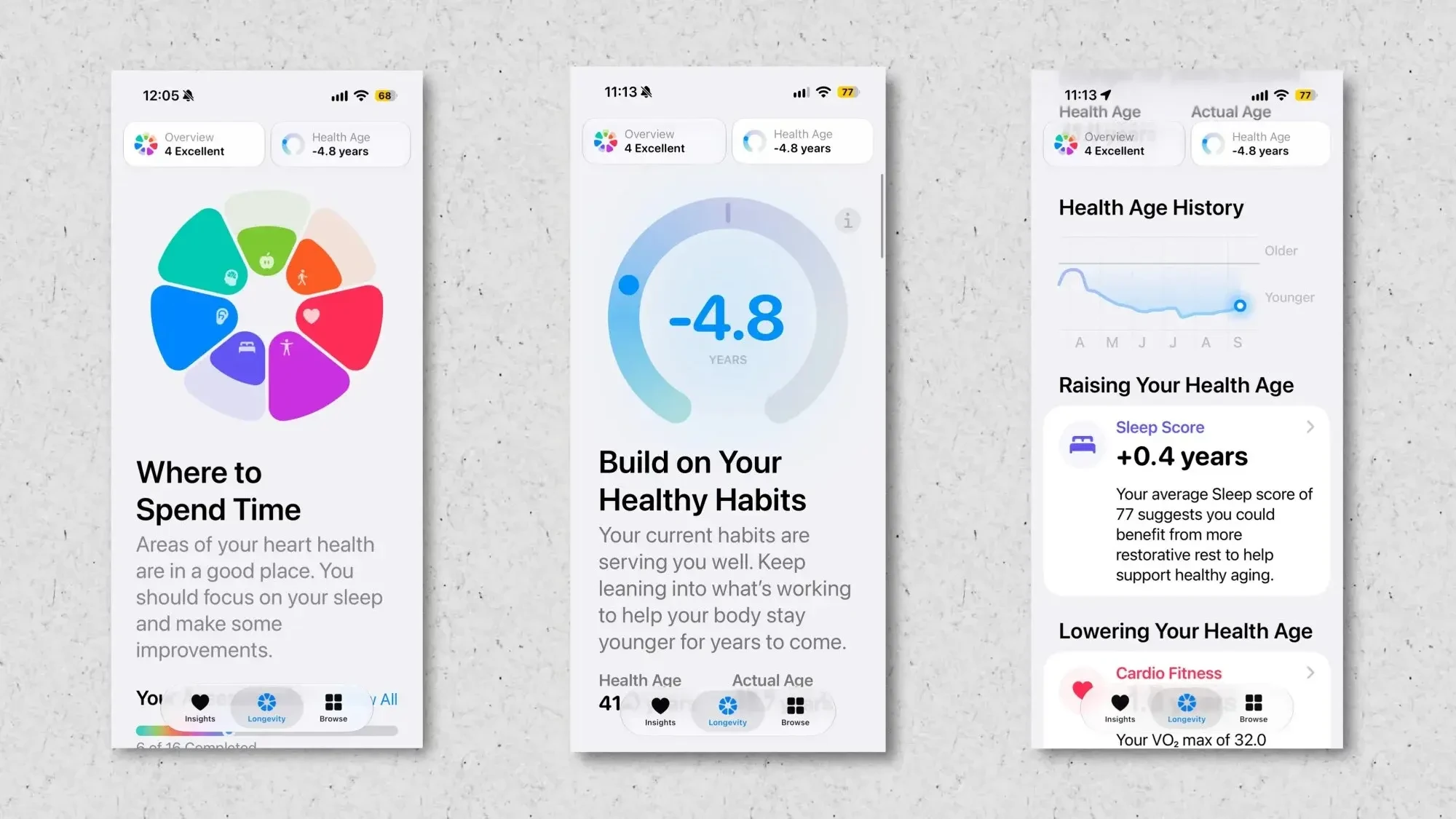
The most prominent feature of iOS 27.2 is undoubtedly the comprehensive revamp of the Health application, marking its most ambitious redesign in years. Designed to offer a more holistic and integrated view of personal wellness, the updated app consolidates multiple fitness metrics into a single, cohesive dashboard. Most notably, users will now be able to view their daily Fitness rings directly within the Health app interface rather than having to jump over to the standalone Fitness application.

Furthermore, the update introduces a dedicated "Longevity" tab, providing deep analytical insights into long-term health metrics such as metabolic health, sleep patterns, daily movement, nutrition, heart health, hearing health, and mental wellbeing. The software also incorporates advanced health assessments, including a novel "Health Age" metric designed to evaluate overall physical condition and identify potential areas for personal improvement. In an even more ambitious integration, users can utilize the iPhone’s front-facing camera to monitor certain workout routines, allowing the system to analyze and rate performance across categories like strength, flexibility, balance, and VO2 max.
Beyond physical health and fitness tracking, iOS 27.2 extends the capabilities of Apple Intelligence through updates to Call Context. This tool leverages on-device intelligence to cross-reference incoming and outgoing phone calls with relevant data stored elsewhere on the device. For example, when contacting a business customer service line, Call Context automatically surfaces relevant information, such as flight itineraries from email correspondence. With the new software update, Apple is expanding this functionality to include automated anniversary and birthday alerts. When placing a call to a contact with a saved special date, a subtle on-screen reminder will appear, helping users stay connected to important personal milestones.
Accessibility is another critical focus of the iOS 27.2 release. Following previous announcements regarding inclusive technology, Apple is introducing API support for human sign language interpreters within FaceTime. While this accessibility enhancement was initially anticipated for earlier versions of the operating system, it is now rolling out in the upcoming update, aiming to make video calls significantly more accessible for members of the Deaf and hard-of-hearing communities.
Entertainment and sharing capabilities are also receiving a practical update with the integration of Apple TV profiles into iOS and iPadOS 27.2. Households that share devices such as an iPad will now be able to switch between individual Apple TV user profiles directly within the app. This functionality mirrors the multi-user experience long available on standalone Apple TV hardware, ensuring personalized viewing recommendations, watch histories, and preference settings for every member of the household on shared mobile screens.

Language support for Apple Intelligence features is also widening significantly with this release. When the artificial intelligence framework initially launched, its capabilities were restricted to English-language queries and commands. iOS 27.2 addresses this limitation by introducing full Siri AI support for several additional languages, including French, Japanese, Korean, Portuguese, and Spanish, opening up advanced conversational and assistive features to a much broader global audience.
In addition to these major functional additions, iOS 27.2 implements a series of subtle user interface tweaks and adjustments across native applications. In the Music app, Apple has dialed back certain red visual accents, transitioning elements like the Play and Shuffle buttons, as well as library section icons, to a sleek black aesthetic. The Clock app features a visual modification where the "AM" and "PM" designations appear noticeably smaller than the primary time digits when setting alarms. The Podcasts app has renamed its "Up Next" queue to "New Episodes" for enhanced clarity, and the Siri settings menu has rebranded "App Access" to "Excluded Apps," while streamlining the process to block multiple applications from interacting with Siri simultaneously.