
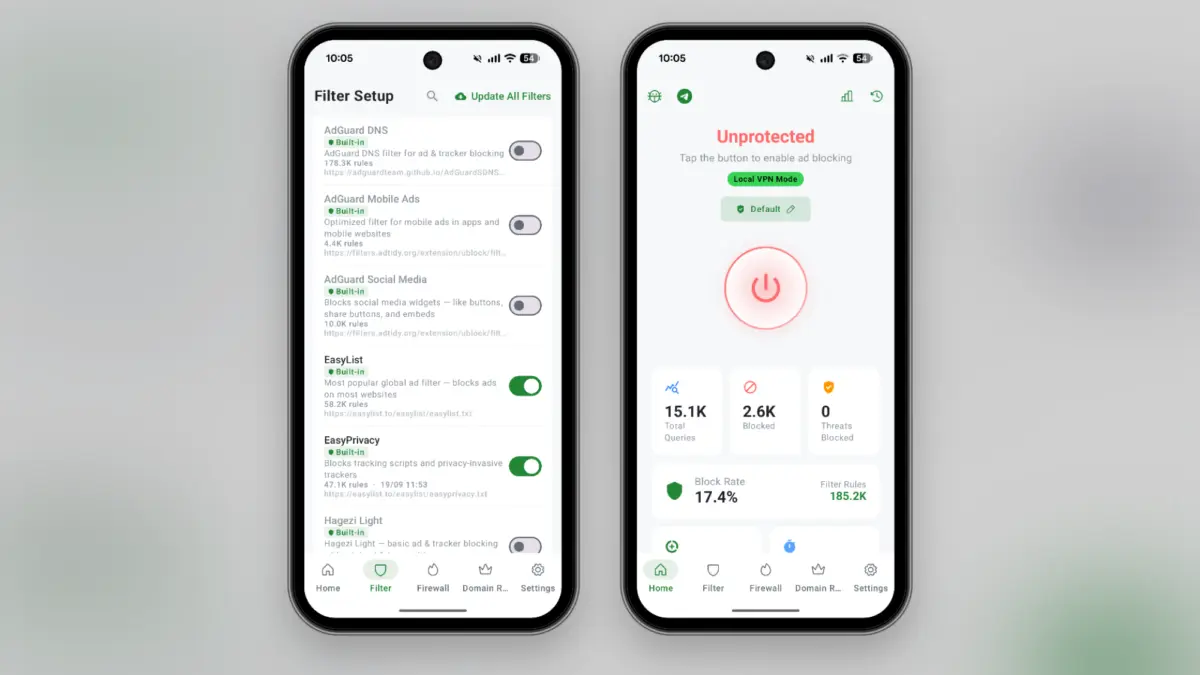

For individuals seeking a comprehensive solution to eliminate ads across the entire operating system, open-source utilities provide a powerful alternative. One notable option is BlockAds, a free utility distributed through platforms like GitHub and F-Droid rather than the traditional Google Play Store. Because it operates outside standard app distribution channels, users may need to navigate specific operating system protocols, such as Google’s implemented sideloading security measures, before installation.
Once activated, BlockAds establishes a local virtual private network profile that operates quietly in the background. Unlike traditional virtual private network services designed to route internet traffic through remote servers for privacy or geographic spoofing, this local configuration filters network requests directly on the device. By employing domain name system filtering, the application automatically intercepts and blocks outbound connections directed toward known advertising networks and data trackers. This process suppresses advertisements within mobile applications without requiring advanced device modifications like rooting. However, this method comes with a notable hardware limitation: because Android restricts devices to a single active virtual private network profile at any given time, users cannot simultaneously run BlockAds and a conventional security-focused virtual private network.

Users who prefer to avoid third-party application profiles can utilize domain name system filtering natively supported by the Android operating system. This approach prevents devices from resolving known advertiser domains, effectively eliminating web-based advertisements. Android includes built-in configuration options allowing individuals to redirect their network queries to specialized providers that incorporate ad-blocking mechanisms. Services such as AdGuard offer free domain name system configurations that can be integrated directly into the operating system settings under network preferences by designating a specific provider hostname.
While native domain name system filtering offers a straightforward alternative, it can occasionally disrupt the functionality of specific websites or applications that rely on standard scripts or full-screen advertisements. For greater flexibility, services like NextDNS provide customizable filtering dashboards where users can manage blocklists, establish whitelists, and toggle protection status as needed. While NextDNS offers a generous free tier accommodating hundreds of thousands of queries monthly, heavier usage requires a paid subscription model.

The challenge of blocking advertisements extends heavily into web browsing, particularly following significant architectural updates implemented by major technology companies regarding browser extension standards. On desktop platforms, alternative browsers like Firefox have maintained robust support for comprehensive content blockers such as uBlock Origin. This dynamic blocking capability translates effectively to mobile environments through the Android version of Firefox, allowing users to install the extension directly from the browser’s add-on menu. The default configuration immediately suppresses web-based advertisements, while advanced users retain the ability to inject custom filter lists for tailored protection.
Video streaming platforms present a distinct obstacle, as major services actively deploy countermeasures against third-party interference. While paid subscriptions remain the official method for removing interruptions on platforms like YouTube, alternative clients have emerged within the open-source community. Applications like NewPipe, hosted on alternative repositories such as F-Droid, provide an independent interface for streaming video content without commercial interruptions, alongside native support for background playback and offline media caching. Users who prefer to remain within conventional software ecosystems can alternatively utilize privacy-oriented browsers like DuckDuckGo, which incorporates built-in content filtering specifically targeting video streaming advertisements.

For users seeking a completely frictionless experience without the complexity of managing extensions, specialized web browsers offer integrated protection out of the box. Applications like the Brave browser for Android automatically neutralize trackers and advertisements by default upon installation. Requiring no manual configuration or secondary extensions, these privacy-focused browsers apply comprehensive filtering rules across general web pages and streaming video services alike, offering a streamlined approach to an ad-free mobile experience.