The rapid pace at which Google launches and retires consumer and enterprise software can sometimes make tracking product lifecycles challenging for users. However, Google Pics represents a more permanent-facing addition to the Workspace environment. The application is currently available to users subscribed to the Google AI Pro tier, priced at $19.99 per month, or the Google AI Ultra tier, which ranges from $99.99 to $199.99 per month. Beyond operating as a standalone web application, Google Pics is designed to surface dynamically within other Google Workspace apps whenever visual creation or editing capabilities are required.
At its core, Google Pics incorporates the Nano Banana AI image generation model. The application bridges the gap between layout creation—such as putting together promotional posters or event flyers—and detailed photographic manipulation, including removing unwanted background objects or altering image elements. For subscribers already investing in Google’s higher-tier AI plans, the tool aims to serve as a comprehensive image creation and editing hub.

How to Use Prompts With Google Pics
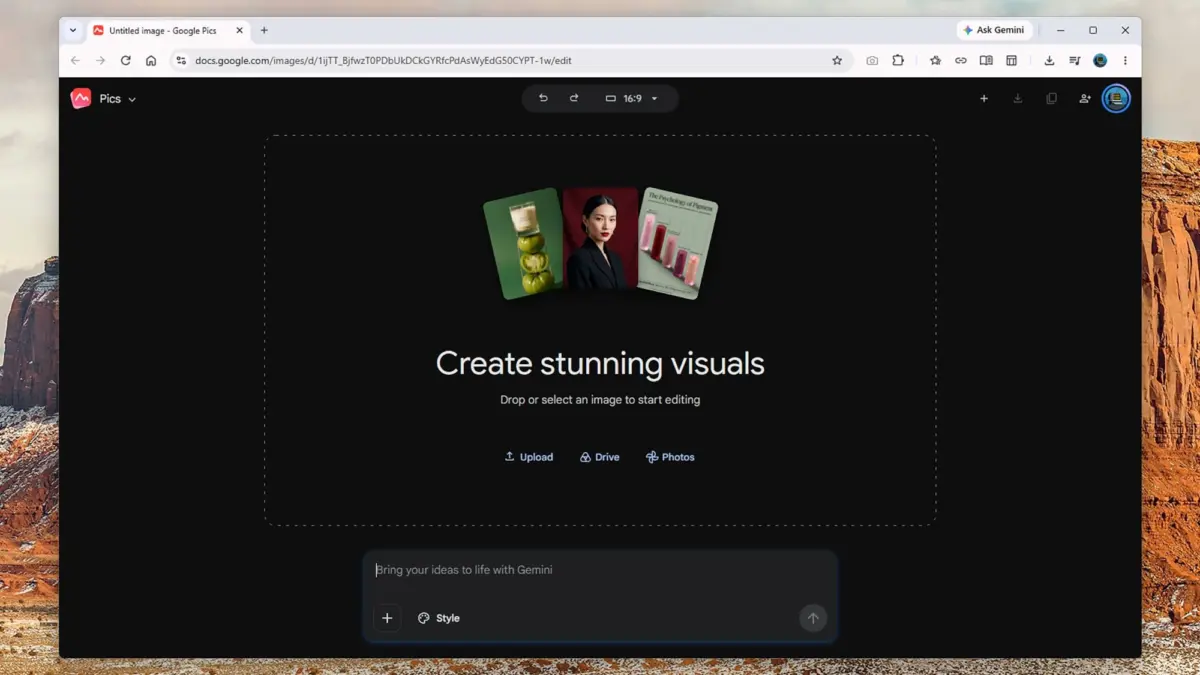
The primary interface of Google Pics is driven through natural language text prompts, allowing users to generate novel imagery from scratch or apply sweeping alterations to existing visual assets. Upon opening the application, users are greeted by an open-ended prompt box reminiscent of the Gemini app interface. The system accepts descriptive commands for everything from photorealistic scenes to printed marketing materials, with more detailed prompts generally yielding more accurate and context-aware results.
The application features a dedicated Style box that enables users to provide visual references to guide the overall aesthetic, mood, and feel of the generated output. Additionally, dedicated integration links allow individuals to upload local files directly or import existing images from Google Drive and Google Photos for immediate editing. An aspect ratio drop-down menu located at the top of the workspace lets creators specify the dimensional parameters of new projects, a setting that remains adjustable throughout the editing process.
When generating new visuals, Google Pics typically supplies four or five alternative thumbnail variations displayed on the left side of the screen, allowing creators to cycle through options to find the best match for their vision. Users also retain the option to generate additional batches of pictures from the original prompt, though this contributes to overall usage quotas. Google maintains a characteristically flexible approach regarding usage limits, noting that "higher access" will remain available to eligible subscribers until February 2027, while variable factors such as exported image resolution directly influence how quickly limits are approached.

Testing the application with a practical scenario—such as generating an A5 flyer for a children’s birthday party featuring specific schedule details, venue information, and decorative requirements—yields a selection of vibrant, professional-looking marketing assets within seconds. While the output carries the familiar polished sheen characteristic of modern generative AI imagery, it successfully adheres to concise creative briefs with minimal friction. Similarly, importing personal photographs allows users to experiment with style transformations, effectively replacing traditional filter galleries with an expansive array of artistic styles ranging from watercolor paintings to comic book aesthetics.
Despite its versatility, Google Pics remains a relatively streamlined utility compared to legacy software. While users can easily undo recent adjustments, zoom in and out, or alter aspect ratios, the platform lacks traditional manual drawing utensils, advanced resizing controls, and robust layer management. Consequently, professional creators will still rely on specialized tools like Adobe Photoshop and Canva for complex, pixel-precise design work.
How to Edit Images in Google Pics
Where Google Pics distinguishes itself is within its intelligent editing suite, which becomes accessible immediately after generating a new asset or importing an existing photograph. The application automatically analyzes visual content to identify discrete, clickable elements within the frame—such as the sky, architectural structures, or geographical features. Users can select these pre-identified components to summon context-specific prompt boxes for targeted modifications.

Alternatively, creators can manually drag a bounding box around any arbitrary section of the screen to initiate localized edits. This functionality allows users to execute contextual modifications, such as changing the color of a specific object or instructing the system to remove unintended background figures from a family photograph. When objects are removed, the underlying AI relies on contextual extrapolation to reconstruct the obscured background based on surrounding visual data. While minor edits integrate seamlessly, more complex alterations involving heavy street traffic or intricate background details occasionally present challenges for the generative model.
Google Pics allows users to queue multiple edits and apply them simultaneously, significantly reducing processing wait times and streamlining the iterative workflow. For instance, when designing promotional flyers, creators can simultaneously adjust typography colors, append new textual lines, and insert supplementary graphic elements. Direct text editing further simplifies layout modifications, enabling users to alter existing text blocks without generating entirely new prompts.
The exploratory nature of the tool encourages casual experimentation, enabling users to execute adjustments ranging from macro-scale atmospheric shifts, such as transforming a daytime photograph into a nocturnal scene, to micro-scale enhancements like inserting supplementary clouds. In certain instances, the AI can perform complex photographic alterations that would typically require advanced technical proficiency and significant time investment in traditional editors—such as artificially aging a vehicle within a scene by several years.
While the resulting imagery may lack the microscopic precision achievable by a skilled human retoucher, these capabilities significantly lower the barrier to entry for casual and rapid image editing tasks. As Google continues to refine its ecosystem integration, Google Pics is positioned to serve as a practical, accessible companion for everyday creative workflows within the Workspace environment, even as specialized applications retain their dominance for advanced, layer-based professional projects.