
For long-time users of Apple’s ecosystem, the Contacts application serves as the bedrock of everyday digital communication. Yet, beneath its minimalist interface lie advanced functions that can significantly streamline digital organization. Independent technology journalist Pranay Parab recently highlighted a comprehensive collection of these lesser-known features, shedding light on how users can optimize their address books to save time and protect sensitive personal data.
One of the most persistent frustrations for digital device owners is the accumulation of redundant entries over time. Whether caused by importing old backups, syncing multiple email accounts, or manually adding people twice, duplicate contacts clutter the interface. On iOS, the operating system attempts to mitigate this by proactively displaying a prompt at the top of the contact list when duplicates are detected, allowing users to resolve the issue with a single tap.

For Mac users, a similar utility is tucked away within the application’s top menu bar. By opening the Contacts app on macOS and navigating to the Card menu, users can select an option to look for duplicates. The software automatically scans the address book, identifies matching records, and presents an interface that enables owners to quickly merge or delete redundant entries without having to manually sift through hundreds of names.
Managing multiple contacts simultaneously has historically presented a user experience challenge on mobile devices, where dragging and selecting items is not as straightforward as using a mouse on a desktop computer. On a Mac, selecting multiple entries is intuitive, requiring users to simply hold the Shift or Control keys while utilizing the arrow keys or clicking individual records.
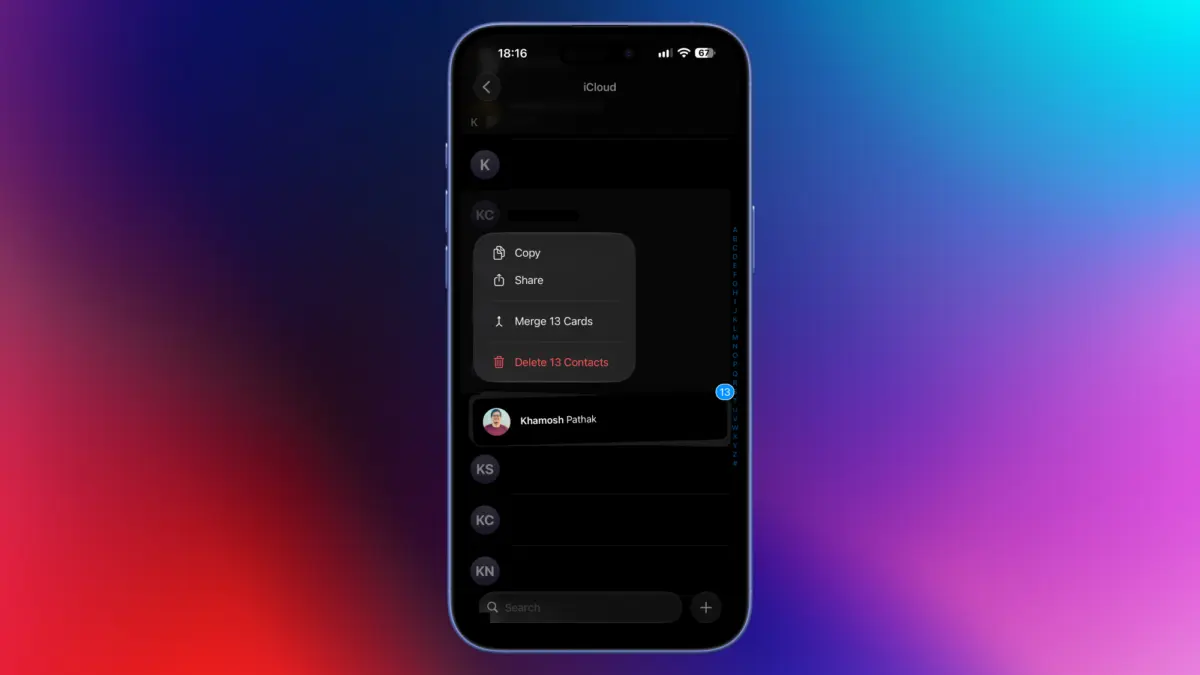
However, achieving the same efficiency on an iPhone or iPad relies on a discreet, hidden gesture. By placing two fingers on the contact list and swiping upward or downward, users can activate a multi-selection mode. Once the gesture is correctly recognized, scrolling through the list while maintaining the selection allows individuals to batch-process entries. This capability forms the fastest method for executing bulk operations, such as mass deletion, directly from a mobile device.
Privacy considerations often complicate the sharing of digital contact cards. When a user sends a contact file from an iPhone, the operating system typically prompts them to select specific fields to include or exclude. This safeguard prevents unintended disclosures, such as sharing a partner’s home address, private birthdates, anniversaries, or sensitive nicknames. While valuable for security, this extra verification step can introduce unnecessary friction during casual communication.

To circumvent this friction when using Apple’s native messaging service, users can employ a simple copy-and-paste workaround. By locating a contact within the app, holding down on the individual’s name, and selecting the copy option, users can instantly paste the contact card directly into an active chat thread within the Messages application. While this shortcut is confined to iMessage and standard text messaging and does not extend to third-party platforms like WhatsApp, it offers a streamlined alternative for quick sharing.
Integration with third-party communication applications has also seen subtle enhancements within Apple’s environment. The Contacts app permits users to initiate chats and phone calls on external platforms—such as WhatsApp, Signal, and Telegram—without necessarily granting those applications full, unrestricted access to the entire address book. By opening a specific contact card and pressing and holding either the messaging button or the call button, a pop-up menu reveals a list of compatible third-party services linked to that phone number. This functionality provides a convenient bridge for users who maintain strict privacy controls over which applications can read their system contacts.
Addressing the challenge of pruning outdated acquaintances, iOS intentionally builds friction into the deletion process to prevent accidental data loss. Removing someone last spoken to years prior usually requires navigating multiple submenus. To expedite this, users can press and hold any contact’s name in the iOS list to trigger a pop-up menu containing a direct delete option. When combined with the aforementioned two-finger swipe gesture, users can select a batch of records, hold down on the highlighted group, and choose a command to delete all selected contacts simultaneously.
Data portability and backup management are primarily handled through the desktop application. Users seeking to export their entire address book can utilize the macOS version of Contacts by accessing the file export settings to generate a standard vCard file. This universal format can subsequently be imported into alternative services, such as Google Contacts. Alternatively, the Mac application provides a built-in feature to export the entire address book or specific groups directly into a Portable Document Format file for physical archiving or printing.

Customizing the default layout of a contact card offers another layer of personalization on desktop hardware. When creating a new entry on a Mac, the application often displays numerous standard fields that many users never utilize, such as secondary postal addresses or custom dates. By accessing the template editing options within the card configuration menu, individuals can permanently strip away unused fields, leaving a streamlined template dedicated strictly to essential data points like phone numbers and email addresses.
Locating recently added acquaintances whose names have slipped from memory can be particularly arduous within a massive digital Rolodex. To solve this, the macOS version of Contacts includes support for smart lists. By establishing custom criteria based on card modification dates—such as filtering for records altered within a specific timeframe like the last ten days—users can instantly generate a dynamic folder that isolates recently created or updated entries. This functionality eliminates the need to manually scroll through alphabetical lists when trying to recall the name of a recently added business contact or service provider.
Beyond temporary additions, smart lists function as automated organizational tools for grouping related individuals. Users who systematically append company names or specific identifiers to their records can configure smart lists to automatically aggregate these contacts into distinct categories based on those parameters.
Finally, the widespread adoption of NameDrop—Apple’s proximity-based contact-sharing feature that allows users to exchange information by bringing two supported devices close together—underscores the importance of maintaining an optimized digital identity. Because NameDrop can automatically share pre-configured details, privacy experts recommend regularly auditing personal contact cards. By tapping one’s own name at the top of the mobile Contacts app and editing the profile, users can strip away sensitive personal details they prefer not to broadcast publicly. Updating the associated profile picture to a professional headshot or a neutral emoji further ensures that quick exchanges via proximity sharing remain secure and controlled.